

FUNCTION SHEETS

One activity.
Three worksheets.

To put the event into practice, your event planner will generate internal working documents from each quote – broken down into catering, service and logistics. Each department can only see the information relevant to them, including any notes intended for them.

No payment details required.

Highlights

The right line-up for every team

Three ways in which Function Sheets bridge the gap between the office, the kitchen and the service team.

Broken down by department

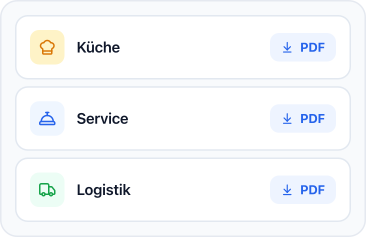
The kitchen, service and logistics teams will each have their own working document – rather than everyone having to search through the customer quote.

Notes with an address

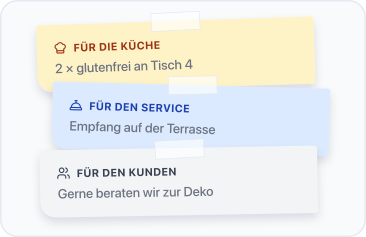
Notes marked ‘For the kitchen’ go only on the kitchen sheet; notes marked ‘For the service team’ go only on the service sheet.

Straight from the catalogue

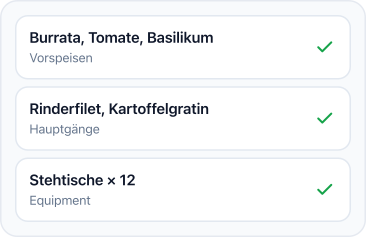
The menu, equipment and notes are taken from the quote you’re creating anyway. There’s no need to type anything out.
No payment details required.

The right information in the right place

As soon as the client’s proposal is finalised, your event planner uses it to create the relevant function sheets for the kitchen, service and storeroom.

Each department only sees what it needs for its part of the event. The kitchen can see menus, quantities and allergy information at a glance. The service team has the schedule and any special requests from guests right in front of them. The stock department receives a ready-made logistics list based on the booked equipment.

No one has to wade through pages of prices and contract details anymore, and you no longer have to type anything out or make follow-up phone calls. This means every team starts the day of the event well prepared.

No payment details required.

Highlights

Three steps to a finished function sheet

You put the quote together once – the kitchen, service and logistics teams will automatically receive their copies.

Put together a quote

Select food, drinks, services, venues and equipment. This forms the basis for the Price & Function Sheet.

Addressing notes

In the ‘Notes’ tab, you can organise your notes by target audience. Each note appears only where it is needed.

Create sheets

Straight from the quote: kitchen, service (including the service charge) and equipment – and the logistics list.

No payment details required.

“The function sheets alone are worth their weight in gold. The kitchen and front-of-house staff finally get exactly the information they need – no more, no less.”

Carla Vitolico

Owner of an events agency

Highlights

All Function Sheets features at a glance.

Kitchen Function Sheet

The event menu plus all the notes ‘For the kitchen’ – the working document at the station.

Function Sheet Service

Including the service charge and a list of equipment, plus any notes ‘For the service’.

Logistics Function Sheet

Generated automatically from the selected equipment, with the quantity shown for each entry.

Notes by target audience

Kitchen, Service, Customer: Each note appears only on the document for which it is intended.

Individual positions

You can add one-off special requests directly to the quotation – without having to go via the master data.

Your branding

The colours, font and logo from the admin area also apply to the function sheets.
No payment details required.

Frequently Asked Questions

Questions about function sheets

What types of function sheets are there?
Three: the Kitchen Function Sheet, the Service Function Sheet (including the service charge and a list of equipment) and the logistics list, which is generated from the selected equipment.
From the package: the menu, equipment and the notes you save in the ‘Notes’ tab. You enter everything once – the function sheets are then generated from this.
No. Notes are separated by target group: customer notes appear on the quote, kitchen notes only on the ‘Kitchen’ sheet, and service notes only on the ‘Service’ sheet.
Yes. The branding from the admin area – colours, font, logo – is applied to all PDFs generated, including the function sheets.

Yes – Function Sheets for service, the kitchen and logistics are included from the Start module onwards.

No payment details required.